Fix [add command failing with ambiguous type names + refactor for performance

### Problem

[add blight would fail with "No type with that name was found" because multiple types contain "blight" (e.g., Server.Items.Blight, Server.Ethics.Evil.Blight, Server.Items.BlightGrippedLongbow, Server.Items.QuiverOfBlight). The old code only succeeded when exactly one type matched the search regardless of constructability and inheriting Mobi les/Items.

### Solution

Exact match takes priority: If a type's name exactly equals the search string (case-insensitive), use it directly. Otherwise, show the AddGump with all partial matches.

- [add blight → Creates Blight (exact name match)
- [add bligh → Shows gump with Blight, BlightGrippedLongbow, etc.

### Refactoring

- CommandEventArgs context: Added GetContext<T>/SetContext<T> to pass resolved type through the command chain without method signature changes
- Removed TrySetupTarget duplication: Validation now happens only in ValidateArgs, eliminating redundant code paths
- Split type matching:
  - ExactMatch(string) → Returns Type for exact name match (used by [add)
  - MatchEmptyCtor(string) → Returns ConstructorInfo[] for gump display (empty-callable constructors only)

### Memory & Performance Improvements

| Optimization                  | Benefit                                                                                      |
|-------------------------------|----------------------------------------------------------------------------------------------|
| _mobileItemTypes cache        | Filters Mobile/Item types once per assembly, reused on all subsequent searches               |
| ReadOnlySpan<string> for args | Avoids string[] heap allocations when slicing arguments                                      |
| ValueStringBuilder            | Stack-allocated string building, avoids StringBuilder heap allocation                        |
| Single type resolution        | Type resolved once in ValidateArgs, passed via context to Execute (was resolved 2-3x before) |
### Summary

- Fixes `[AdvancedSearch` being accessible by players 😱
- Adds `[GenCommands` to generate the same commands html page on https://muo.gg/commands.
- Fixes `[helpinfo` so all commands properly show up!

> [!WARNING]
> ### Developer Warning:
> Commands must now be registered in the `Configure` bootup phase.
> If a command is not registered early enough, it may not be available to systems like [helpinfo
> that cache their information.

> [!NOTE]
> ### Developer Note:
> Various commands related to generating content have been changed to _Developer_ and above access level.

### Screenshots
<img width="673" alt="image" src="https://github.com/modernuo/ModernUO/assets/3953314/b105b5c9-5eb4-4ace-93ff-1bfb31e7132f">

<img width="547" alt="image" src="https://github.com/modernuo/ModernUO/assets/3953314/e97487e8-47a5-4aa7-89cc-9fe3deda584d">
## Adds Auto Archiving
Backups are archived once an hour, day, and month. Archives older than 60 days are pruned automatically.

_Note: Automatic pruning is off by default_

### Archive compression format
The following formats are supported:
* Zstd (The fastest with best compression ratio)
* GZip
* Zip
* None (Tar)

_Note: By default archives use [zstandard](http://facebook.github.io/zstd/) format.
The archive format can be changed in modernuo.json `autoArchive.compressionFormat`_

### Restoring world from archive
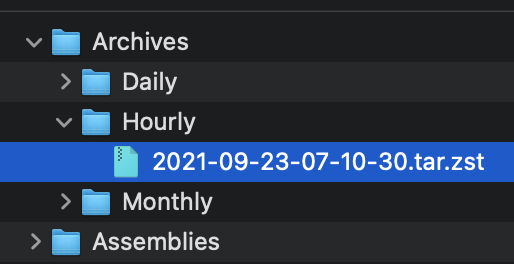
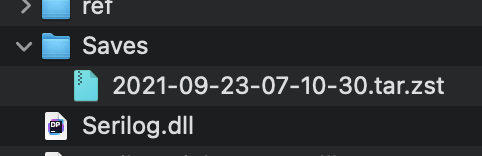
Move the archive to the Saves folder (tar.zst file). On startup the server will extract the file and restore the latest save. See pictures below.

### Manually extracting an archives
#### Windows
* Use the latest version of [7-zip w/ ZStandard](https://github.com/mcmilk/7-Zip-zstd/releases/latest)
  1. Extract the `.tar.zst` file.
  2. Extract the `.tar` file. (Yes you have to do it in two steps)
* On Windows 10 you can use the command line. `zstd.exe` is in the Assemblies folder after building ModernUO.
  1. `tar --use-compress-program "Distribution\Assemblies\zstd.exe -d" -xvf "Archives\Hourly\archivefile.tar.zst" -C "path to where you want to extract it"`
#### Mac
* Install [Keka](https://www.keka.io)
  1. Drop the .tar.zst onto the keka interface.
#### Linux
  1. Install zstd from a package manager
  2. Run `tar -I zstd -xvf "Archives\Hourly\archivefile.tar.zst" -C "path to where you want to extract it"`

### Other changes
* Changes Autosave to occur at the same time no matter when the server is booted.
* Adds `[SaveFrequency <delay> [warning]`command to set save frequency and warning frequency in-game.
* Adds support for time zones that are configurable. The system timezone can also be manually configured. Check `TimeZoneHandler.cs` for details.

<img width="257" alt="Screen Shot 2021-09-22 at 11 23 18 PM" src="https://user-images.githubusercontent.com/3953314/134464929-a5bf3cd8-2ef0-4476-a9ad-71d0816a19ac.png">
<img width="241" alt="Screen Shot 2021-09-22 at 11 23 39 PM" src="https://user-images.githubusercontent.com/3953314/134464945-5f6f96dc-3d1e-434d-8256-5c6b3705e786.png">
<img width="836" alt="Screen Shot 2021-09-22 at 11 34 39 PM" src="https://user-images.githubusercontent.com/3953314/134464957-625e57f2-ef47-4ca1-a0a7-cd40c9b6539c.png">
<img width="631" alt="Screen Shot 2021-09-22 at 11 34 50 PM" src="https://user-images.githubusercontent.com/3953314/134464969-b2d65c0d-f8f5-497a-a832-5d805e8e0b22.png">