### Summary

- [X] Removes migration files were committed that aren't actually (and have never) been used.
- [X] Moves runebook entry from being manually serialized to using the serialization generator.
- [X] Automatically collapses migration files in github PRs.
- [X] CI/CD now checks to see if migrations are missing or modified.
- [X] Updates dependencies
- [X] Adds Fedora 37, Alpine 3.17 support
## BREAKING CHANGE
**Publishing for linux will no longer include runtimes**
## Major Changes
* Adds .NET 7 support.
* Adds ARM64 support (experimental).
* Changes linux support to be open-ended against anything .NET 7 supports.
* Fixes native library resolutions. (Make sure to install `dev` versions of the libraries)
* Updates README
* Adds Ubuntu 22, CentOS 8/9 Stream to CI/CD.
## TODOs:
* Update modernuo.com docs
Closes#1173Closes#1159
* Adds `SerializationProperty` - This will generate the private variable for serialization. Also provides an option `useField` to specify your own. Example:
  ```cs
  [SerializationProperty(0, useField: nameof(_resource)]
  ```
- [X] Replace serialization generator with nuget
- [X] Replace schema migration with dotnet bool
- [X] Add ability to run migrations in VS/Rider using a project build
* Fixes an issue with moving directories across volumes
* Removes usages of WebClient
* Removes usages of Cryptographic Providers

Note: Even though .NET 6 introduces Xoshiro RNG, there is no way to control the seed. I'll do some reconciliation of Xoshiro so it functions closer to the built in one. For the most part, it has parity though.
Benchmarks show there is nothing odd about the implementations, they are within 1ns of each other.
* Now reads Prof.txt to get the professions
* The templated professions are based on profession `TrueName`
* Adds missing starting equipment
* Implements gargish starting equipment
* Consolidates some of the code
* Moves TC stuff to the TC file.
* Fixes some starting equipment that was wrong.

Note:
* Implementing the original T2A professions is possible on the client side, but requires moving the old clilocs to the current clilocs file. In the current file the entries are blank.
* Using the original LBR professions (they match AOS but without necromancy/chivalry) is kind of confusing because the profession indexes are ripped out of the UOTD/UOR ones and have non-sequential indexes. This will probably cause confusion and people will get no templated items when they select the wrong profession.
## Adds Auto Archiving
Backups are archived once an hour, day, and month. Archives older than 60 days are pruned automatically.

_Note: Automatic pruning is off by default_

### Archive compression format
The following formats are supported:
* Zstd (The fastest with best compression ratio)
* GZip
* Zip
* None (Tar)

_Note: By default archives use [zstandard](http://facebook.github.io/zstd/) format.
The archive format can be changed in modernuo.json `autoArchive.compressionFormat`_

### Restoring world from archive
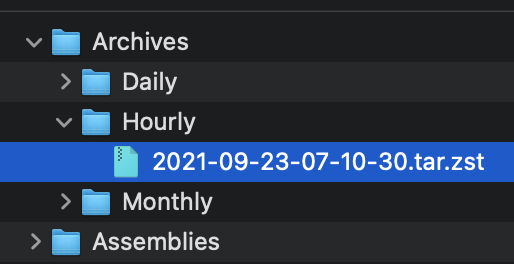
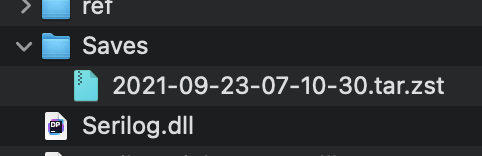
Move the archive to the Saves folder (tar.zst file). On startup the server will extract the file and restore the latest save. See pictures below.

### Manually extracting an archives
#### Windows
* Use the latest version of [7-zip w/ ZStandard](https://github.com/mcmilk/7-Zip-zstd/releases/latest)
  1. Extract the `.tar.zst` file.
  2. Extract the `.tar` file. (Yes you have to do it in two steps)
* On Windows 10 you can use the command line. `zstd.exe` is in the Assemblies folder after building ModernUO.
  1. `tar --use-compress-program "Distribution\Assemblies\zstd.exe -d" -xvf "Archives\Hourly\archivefile.tar.zst" -C "path to where you want to extract it"`
#### Mac
* Install [Keka](https://www.keka.io)
  1. Drop the .tar.zst onto the keka interface.
#### Linux
  1. Install zstd from a package manager
  2. Run `tar -I zstd -xvf "Archives\Hourly\archivefile.tar.zst" -C "path to where you want to extract it"`

### Other changes
* Changes Autosave to occur at the same time no matter when the server is booted.
* Adds `[SaveFrequency <delay> [warning]`command to set save frequency and warning frequency in-game.
* Adds support for time zones that are configurable. The system timezone can also be manually configured. Check `TimeZoneHandler.cs` for details.

<img width="257" alt="Screen Shot 2021-09-22 at 11 23 18 PM" src="https://user-images.githubusercontent.com/3953314/134464929-a5bf3cd8-2ef0-4476-a9ad-71d0816a19ac.png">
<img width="241" alt="Screen Shot 2021-09-22 at 11 23 39 PM" src="https://user-images.githubusercontent.com/3953314/134464945-5f6f96dc-3d1e-434d-8256-5c6b3705e786.png">
<img width="836" alt="Screen Shot 2021-09-22 at 11 34 39 PM" src="https://user-images.githubusercontent.com/3953314/134464957-625e57f2-ef47-4ca1-a0a7-cd40c9b6539c.png">
<img width="631" alt="Screen Shot 2021-09-22 at 11 34 50 PM" src="https://user-images.githubusercontent.com/3953314/134464969-b2d65c0d-f8f5-497a-a832-5d805e8e0b22.png">
### Changes/Fixes:
* Adds timer pooling.
* Allows pool to be configurable in ModernUO.json
* Pool replenishes itself asynchronously if depleted.
* Fixes an issue with barkeeps and town criers
* Fixes an issue with incognito buff icons not being removed
* Fixes an issue with polymorph name mod not being removed
* Fixes several places where timers go on forever even after an object is deleted, keeping a reference (memory leak)
* Eliminates the timer for MiningCart altogether.
* Deletes `AcidSlime` since it is a duplicate of `PoolOfAcid`
* Fixes HonorableExecution and standardizes the code for other Bushido moves.

## Changes to the Timer API:
```cs
public class Timer
{
  // Creates a timer that will be returned to the pool once execution stops.
  public static void StartTimer(Action callback);
  public static void StartTimer(TimeSpan delay, Action callback);
  public static void StartTimer(TimeSpan delay, TimeSpan interval, Action callback);
  public static void StartTimer(TimeSpan interval, int count, Action callback);
  public static void StartTimer(TimeSpan delay, TimeSpan interval, int count, Action callback);

  // Creates a timer and returns a token for more control. Requires manual cancellation in order for the timer to be returned to the pool.
  // If the token is dereferenced, the timer will be dereferenced too. While not returning a timer to the pool is not considered hazardous, it does defeat the purpose of pooled timers.
  public static void StartTimer(Action callback, out TimerExecutionToken token);
  public static void StartTimer(TimeSpan delay, Action callback, out TimerExecutionToken token);
  public static void StartTimer(TimeSpan delay, TimeSpan interval, Action callback, out TimerExecutionToken token);
  public static void StartTimer(TimeSpan interval, int count, Action callback, out TimerExecutionToken token);
  public static void StartTimer(TimeSpan delay, TimeSpan interval, int count, Action callback, out TimerExecutionToken token);

  // If you aren't sure how to use the API above, or you don't care about performance, then you can use the old RunUO Timer.DelayCall
  public static DelayCallTimer DelayCall(Action callback);
  public static DelayCallTimer DelayCall(TimeSpan delay, Action callback);
  public static DelayCallTimer DelayCall(TimeSpan delay, TimeSpan interval, Action callback);
  public static DelayCallTimer DelayCall(TimeSpan interval, int count, Action callback);
  public static DelayCallTimer DelayCall(TimeSpan delay, TimeSpan interval, int count, Action callback);
}

public struct TimerExecutionToken
{
  public bool Running { get; }
  public int Index { get; }
  public int RemainingCount { get; }
  public DateTime Next { get; }
}
```

## When to use `TimerExecutionToken`?
Use tokens when you want to gain the performance benefit of using a pooled timer, but you need one of the following:
* Access to the next time the timer will tick:`token.Next`
* Access to which interval, how many intervals there are, or how many are remaining: `token.Index`, `token.Count`, and `token.RemainingCount`
* Stop a timer manually.
* Determine if the timer is running: `timer.Running`
* See notes below about requirements for using tokens!

## Notes about using the TimerExecutionToken:
When you opt-in to receive a token, you must call `Cancel()` to return the timer. This can be done inside of the callback, or outside of the callback at any time.
If this is not called and your timer is an infinite interval, then you will create a potential memory leak, or null pointer exception in your callback.
If the timer ends and is stopped, but cancel is not called, then the timer will never return to the pool and stay referenced until the token is deleted or cancel is called. (Memory leak)

## Is this thread safe?
No. The ModernUO timer system is not thread safe at all. If you require a thread safe timer system, contact me and I'll help adapt this system. Keep in mind that there is a massive performance hit to make this thread safe when there are literally no use cases for it.

If you need to synchronize execution, meaning you want to execute code from another thread on the core thread. Let's say you have a discord bot that is pushing commands to the game server. Then use `EventLoopContext.Post(SendOrPostCallback callback, object state);`.
**Note for Rider users** Code generation only works with Rider v2021.1+. For Rider 2021.1.x you must set a global msbuild attribute so that the IDE can recognize generated code after building. JetBrains claims this will be fixed in Rider 2021.2.

**Rider 2021.1 Required Setting for Code Generation**
<img width="945" alt="Screen Shot 2021-07-19 at 9 36 30 PM" src="https://user-images.githubusercontent.com/3953314/126262725-a4d58dd0-e9e0-400f-a172-0b29ef7a00d7.png">

**Note for VS 2019+ users**: Code generation requires completely cleaning your solution, doing a full build, closing VS 2019, and then opening the solution. This is a known issue and there are no plans to fix this multiple restart requirement for VS 2022 at this time.
- [X] Fixes bad `ReadEnum` by size
- [X] Fixes array, list, and set not handling null values properly.
  - It will be up to the user (for now) to null out empty lists using `[AfterDeserialization]`. Convenience may be added later.
- [X] Fixes errors with `dotnet clean` and non-empty generation folder
- [X] Fixes bad field indexes on `Account.cs` causing `tags` to not be serialized/deserialized.
  - This was caused by a duplicate entry. Don't have protection against this _yet_.