ModernUO Emulator
 3f6a87483b
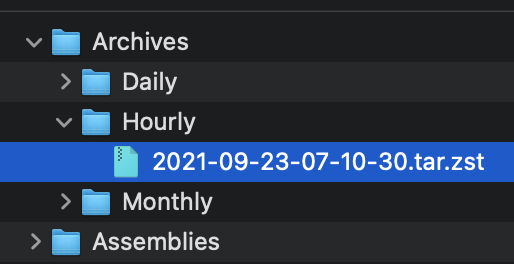
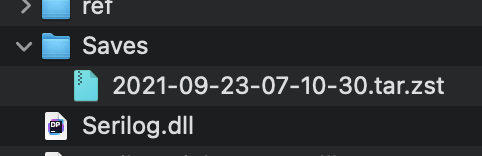
## Adds Auto Archiving Backups are archived once an hour, day, and month. Archives older than 60 days are pruned automatically. _Note: Automatic pruning is off by default_ ### Archive compression format The following formats are supported: * Zstd (The fastest with best compression ratio) * GZip * Zip * None (Tar) _Note: By default archives use [zstandard](http://facebook.github.io/zstd/) format. The archive format can be changed in modernuo.json `autoArchive.compressionFormat`_ ### Restoring world from archive Move the archive to the Saves folder (tar.zst file). On startup the server will extract the file and restore the latest save. See pictures below. ### Manually extracting an archives #### Windows * Use the latest version of [7-zip w/ ZStandard](https://github.com/mcmilk/7-Zip-zstd/releases/latest) 1. Extract the `.tar.zst` file. 2. Extract the `.tar` file. (Yes you have to do it in two steps) * On Windows 10 you can use the command line. `zstd.exe` is in the Assemblies folder after building ModernUO. 1. `tar --use-compress-program "Distribution\Assemblies\zstd.exe -d" -xvf "Archives\Hourly\archivefile.tar.zst" -C "path to where you want to extract it"` #### Mac * Install [Keka](https://www.keka.io) 1. Drop the .tar.zst onto the keka interface. #### Linux 1. Install zstd from a package manager 2. Run `tar -I zstd -xvf "Archives\Hourly\archivefile.tar.zst" -C "path to where you want to extract it"` ### Other changes * Changes Autosave to occur at the same time no matter when the server is booted. * Adds `[SaveFrequency <delay> [warning]`command to set save frequency and warning frequency in-game. * Adds support for time zones that are configurable. The system timezone can also be manually configured. Check `TimeZoneHandler.cs` for details. <img width="257" alt="Screen Shot 2021-09-22 at 11 23 18 PM" src="https://user-images.githubusercontent.com/3953314/134464929-a5bf3cd8-2ef0-4476-a9ad-71d0816a19ac.png"> <img width="241" alt="Screen Shot 2021-09-22 at 11 23 39 PM" src="https://user-images.githubusercontent.com/3953314/134464945-5f6f96dc-3d1e-434d-8256-5c6b3705e786.png"> <img width="836" alt="Screen Shot 2021-09-22 at 11 34 39 PM" src="https://user-images.githubusercontent.com/3953314/134464957-625e57f2-ef47-4ca1-a0a7-cd40c9b6539c.png"> <img width="631" alt="Screen Shot 2021-09-22 at 11 34 50 PM" src="https://user-images.githubusercontent.com/3953314/134464969-b2d65c0d-f8f5-497a-a832-5d805e8e0b22.png"> |
||
|---|---|---|
| .github | ||
| Distribution/Data | ||
| docs | ||
| Projects | ||
| .editorconfig | ||
| .gitattributes | ||
| .gitignore | ||
| azure-pipelines.yml | ||
| CODE_OF_CONDUCT.md | ||
| CONTRIBUTING.md | ||
| Directory.Build.props | ||
| FAQ.md | ||
| GOALS.md | ||
| LICENSE | ||
| mkdocs.yml | ||
| ModernUO.sln | ||
| publish.cmd | ||
| publish.sh | ||
| README.md | ||
| rider-settings.zip | ||
| Rules.ruleset | ||
| RUNUO_MIGRATIONS.md | ||
| SPONSORS.md | ||
| stylecop.json | ||
| THIRD-PARTY-NOTICES | ||
| version.json | ||

ModernUO 



Ultima Online Server Emulator for the modern era!




Requirements
Supported Operating Systems


Running the server

Development




Supported IDEs


Note: VS Code is not currently supported.
Getting Started
- Install prerequisite requirements
- Clone this repository (or download the latest):
git clone https://github.com/modernuo/ModernUO.git
- Open
ModernUO.slnto start developing
Building/Publishing
- Run
./publish.cmd [release|debug (default: release)] [os]os- Supported operating systemswin- Windows 8.1/10/2016/2019osx- MacOS 10.13+/11.0 (High Sierra, Mojave, Catalina, & Big Sur)ubuntu.16.04,ubuntu.18.04ubuntu.20.04- Ubuntu LTSdebian.9,debian.10- Debiancentos.7,centos.8- CentOSfedora.32,fedora.33,fedora.34- Fedorarhel.7,rhel.8- Redhat- If blank, the operating system running the build is used
Note: Building in Visual Studio (or Rider) will not run the schema migration. The schema migration ensures future changes to the code will be backward compatible.
Running the Server
- Follow the publish instructions
- Run
ModernUO.exeordotnet ModernUO.dllfrom theDistributiondirectory on the server
Thanks
Troubleshooting / FAQ
- See FAQ
Want to sponsor?
Thank you for supporting us! You can find out how by visiting the sponsors page.
Development Tools provided with ♥ by 