ModernUO Emulator
| Data | ||
| Scripts | ||
| Server | ||
| .editorconfig | ||
| .gitignore | ||
| .travis.yml | ||
| GOALS.md | ||
| LICENSE | ||
| rdrand.so | ||
| rdrand32.dll | ||
| rdrand64.dll | ||
| README.md | ||
| RunUO.sln | ||
| RunUO.vshost.exe.manifest | ||
| zlib32.dll | ||
| zlib64.dll | ||

ModernUO
Contacts
Goals
- See Goals
Requirements
- .NET Framework 4.7 or Mono 5.10+
- zlib (Linux only)
- DotNetCompilerPlatform v2.0+ (Windows Only)
Building using Visual Studio (Recommended)
- Build
Serverproject- Building with Visual Studio for Windows will install
DotNetCompilerPlatformautomatically.
- Building with Visual Studio for Windows will install
Building for Windows (Without Visual Studio)
C:\Windows\Microsoft.NET\Framework64\v4.0.30319\csc /optimize /unsafe /t:exe /out:RunUO.exe /win32icon:Server\runuo.ico /d:NEWTIMERS /recurse:Server\\*.cs
- DotNetCompilerPlatform must be installed with the
csc.exefile in theroslynfolder at the root of the repository.
Building for Mac/Linux (Without Visual Studio)
mcs -optimize+ -unsafe -t:exe -out:RunUO.exe -win32icon:Server/runuo.ico -nowarn:219,414 -d:NEWTIMERS -d:MONO -recurse:"Server/*".cs
Running on Mac/Linux (MONO)
mono RunUO.exe
Troubleshooting / FAQ
Scripts fail to compile on Windows
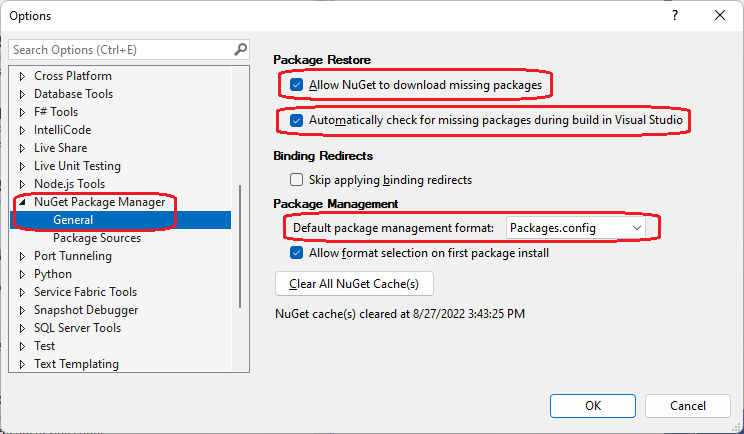
This is usually caused nuget packages not being installed. Install the required packages and rebuild the Server project. Note: The required nuget packages can be set to automatically restore on build with this setting