 3f6a87483b
## Adds Auto Archiving
Backups are archived once an hour, day, and month. Archives older than 60 days are pruned automatically.

_Note: Automatic pruning is off by default_

### Archive compression format
The following formats are supported:
* Zstd (The fastest with best compression ratio)
* GZip
* Zip
* None (Tar)

_Note: By default archives use [zstandard](http://facebook.github.io/zstd/) format.
The archive format can be changed in modernuo.json `autoArchive.compressionFormat`_

### Restoring world from archive
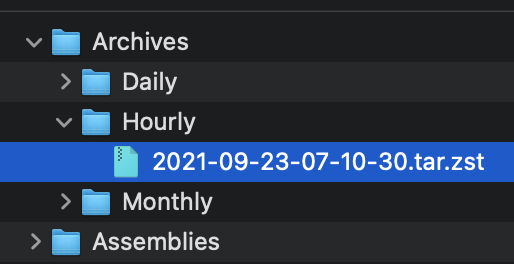
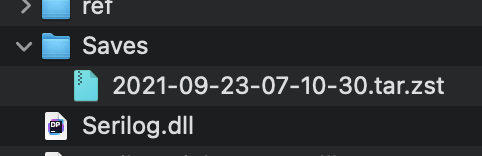
Move the archive to the Saves folder (tar.zst file). On startup the server will extract the file and restore the latest save. See pictures below.

### Manually extracting an archives
#### Windows
* Use the latest version of [7-zip w/ ZStandard](https://github.com/mcmilk/7-Zip-zstd/releases/latest)
  1. Extract the `.tar.zst` file.
  2. Extract the `.tar` file. (Yes you have to do it in two steps)
* On Windows 10 you can use the command line. `zstd.exe` is in the Assemblies folder after building ModernUO.
  1. `tar --use-compress-program "Distribution\Assemblies\zstd.exe -d" -xvf "Archives\Hourly\archivefile.tar.zst" -C "path to where you want to extract it"`
#### Mac
* Install [Keka](https://www.keka.io)
  1. Drop the .tar.zst onto the keka interface.
#### Linux
  1. Install zstd from a package manager
  2. Run `tar -I zstd -xvf "Archives\Hourly\archivefile.tar.zst" -C "path to where you want to extract it"`

### Other changes
* Changes Autosave to occur at the same time no matter when the server is booted.
* Adds `[SaveFrequency <delay> [warning]`command to set save frequency and warning frequency in-game.
* Adds support for time zones that are configurable. The system timezone can also be manually configured. Check `TimeZoneHandler.cs` for details.

<img width="257" alt="Screen Shot 2021-09-22 at 11 23 18 PM" src="https://user-images.githubusercontent.com/3953314/134464929-a5bf3cd8-2ef0-4476-a9ad-71d0816a19ac.png">
<img width="241" alt="Screen Shot 2021-09-22 at 11 23 39 PM" src="https://user-images.githubusercontent.com/3953314/134464945-5f6f96dc-3d1e-434d-8256-5c6b3705e786.png">
<img width="836" alt="Screen Shot 2021-09-22 at 11 34 39 PM" src="https://user-images.githubusercontent.com/3953314/134464957-625e57f2-ef47-4ca1-a0a7-cd40c9b6539c.png">
<img width="631" alt="Screen Shot 2021-09-22 at 11 34 50 PM" src="https://user-images.githubusercontent.com/3953314/134464969-b2d65c0d-f8f5-497a-a832-5d805e8e0b22.png">


95 lines
3.1 KiB
C#
Executable file
95 lines
3.1 KiB
C#
Executable file
using System.Collections.Generic;
|
|
using System.Diagnostics;
|
|
using System.IO;
|
|
using System.Reflection;
|
|
|
|
namespace Server.Compression
|
|
{
|
|
public static class ZstdArchive
|
|
{
|
|
private static readonly string _pathToZstd = new FileInfo(Assembly.GetExecutingAssembly().Location).Directory?.FullName;
|
|
|
|
public static bool ExtractToDirectory(string fileNamePath, string outputDirectory)
|
|
{
|
|
// bsdtar has a bug and hangs, so we are doing it in two steps.
|
|
if (Core.IsWindows)
|
|
{
|
|
var tempTarArchive = Path.Combine(Core.BaseDirectory, "temp/temp-file.tar");
|
|
|
|
try
|
|
{
|
|
var process = new Process
|
|
{
|
|
StartInfo = new ProcessStartInfo
|
|
{
|
|
FileName = _pathToZstd,
|
|
Arguments = $"--no-progress -d \"{fileNamePath}\" -o \"${tempTarArchive}\""
|
|
}
|
|
};
|
|
|
|
process.Start();
|
|
process.WaitForExit();
|
|
|
|
return process.ExitCode == 0 && TarArchive.ExtractToDirectory(tempTarArchive, outputDirectory);
|
|
}
|
|
catch
|
|
{
|
|
return false;
|
|
}
|
|
finally
|
|
{
|
|
File.Delete(tempTarArchive);
|
|
}
|
|
}
|
|
|
|
return TarArchive.ExtractToDirectory(fileNamePath, outputDirectory, "zstd -d", _pathToZstd);
|
|
}
|
|
|
|
public static bool CreateFromPaths(
|
|
List<string> paths,
|
|
string destinationArchiveFileName,
|
|
int compressionLevel = 10
|
|
)
|
|
{
|
|
Debug.Assert(compressionLevel is >= 1 and <= 22, $"{nameof(compressionLevel)} must be between 1 and 22");
|
|
|
|
// bsdtar has a bug and hangs, so we are doing it in two steps.
|
|
if (Core.IsWindows)
|
|
{
|
|
var tempTarArchive = Path.Combine(Core.BaseDirectory, "temp/temp-file.tar");
|
|
|
|
try
|
|
{
|
|
if (!TarArchive.CreateFromPaths(paths, tempTarArchive))
|
|
{
|
|
return false;
|
|
}
|
|
|
|
var process = new Process
|
|
{
|
|
StartInfo = new ProcessStartInfo
|
|
{
|
|
FileName = $"{_pathToZstd}\\zstd.exe",
|
|
Arguments = $"--no-progress -10 \"{tempTarArchive}\" -o \"{destinationArchiveFileName}\""
|
|
}
|
|
};
|
|
|
|
process.Start();
|
|
process.WaitForExit();
|
|
|
|
return process.ExitCode == 0;
|
|
}
|
|
catch
|
|
{
|
|
return false;
|
|
}
|
|
finally
|
|
{
|
|
File.Delete(tempTarArchive);
|
|
}
|
|
}
|
|
|
|
return TarArchive.CreateFromPaths(paths, destinationArchiveFileName, $"zstd -10", _pathToZstd);
|
|
}
|
|
}
|
|
}
|